
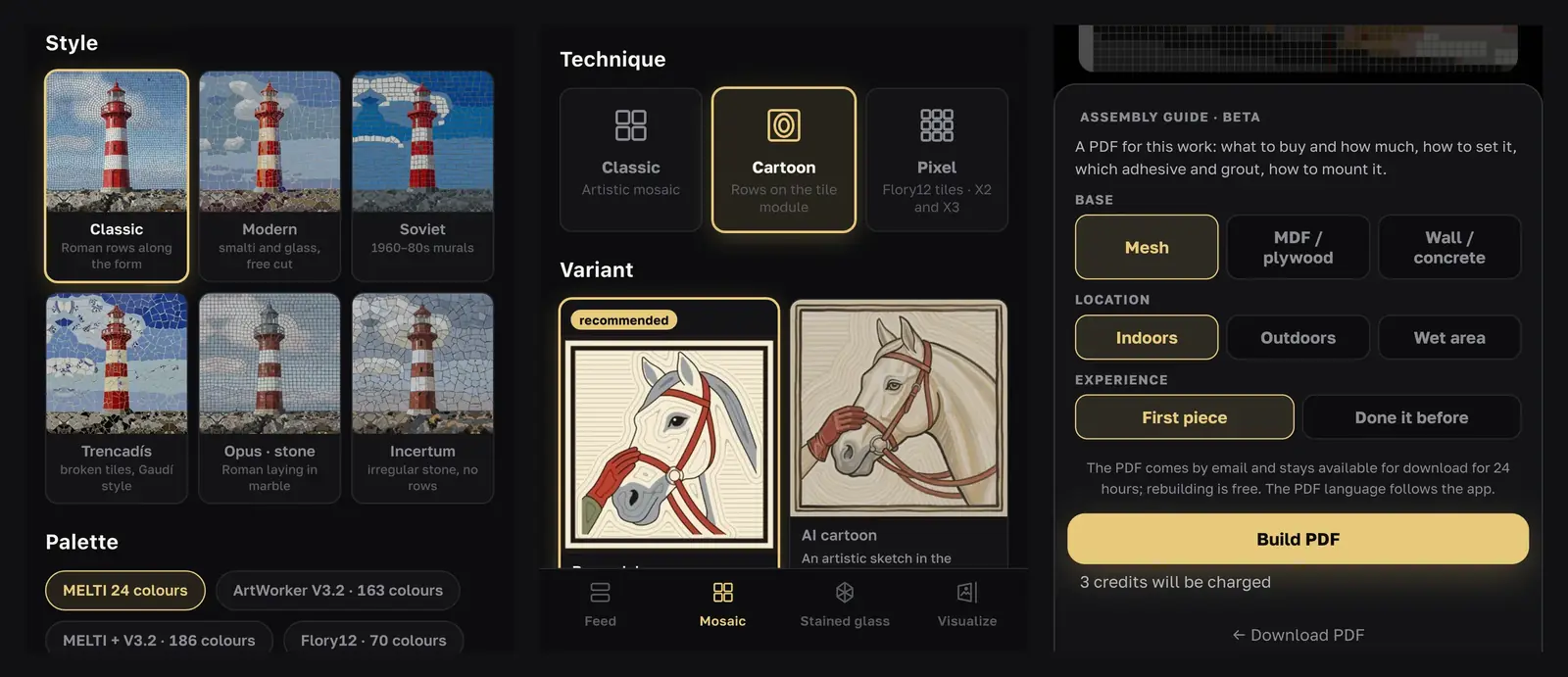
Andamento is the mosaic design app built by the ArtWorker team, the same people who run this school and our studio. It turns a photo or a few words into a mosaic sketch on a palette of real materials, with the rows of tesserae drawn in, and it can make a cartoon: the full-size drawing you set a mosaic on. This guide shows how our students use it alongside the courses, from an idea to a printed cartoon on the worktable.
For how AI design tools work in general and what they still can't do, read our overview of the AI mosaic generator. This page is the practical part.
What Andamento does
Andamento runs in the browser on a phone or a computer, and you can add it to your home screen like an app. The interface is in English and Russian, and the step-by-step guides at andamento.pro are also in Spanish and Portuguese.
You start in one of two ways:
- From a photo. Upload a picture with a clear subject. This needs a free account.
- From a description. Write the subject, the background and two to four colors, for example "a fox in a winter forest, blue and orange", or start from a preset such as Ornament, Flowers or Bird.
Then you choose a technique:
- Classic is an artistic mosaic in one of six styles: Classic (Roman rows along the form), Modern, Soviet, Trencadís, Opus · stone and Incertum.
- Cartoon draws rows fitted to the size of your tesserae, ready to set on.
- Pixel and the matrix techniques turn the picture into a strict grid of square tiles.
Under every finished design you get a free materials estimate, a PDF "sketch passport" with the picture, settings and materials, and options to print the design at full size and to build an assembly guide.
A sketch or a cartoon: which one you need
A sketch shows the look of the future mosaic: the colors and the overall movement. A cartoon is the working drawing: its lines show where every row of tesserae runs, at the real size of the piece. In our courses, students draw the cartoon by hand. In Andamento, the Cartoon technique offers two variants:
- Measured to the tesserae, the variant marked recommended in the app and the one to set from. The rows are calculated from the tessera size plus a 1 mm (about 1/32 in) joint, so you can check them with a ruler and print them 1:1. Details smaller than a tessera are simplified.
- AI cartoon. An artistic sketch in the manner of our school's cartoons. The number and spacing of rows aren't exact, so use it for inspiration and the overall look, not for setting.
For the measured variant you also choose how the background rows run around the subject (Roman laying, Waves or Fan), whether to add a dark border row, the palette and the tessera size: 15 mm (5/8 in) on the free plan, or 10 mm (3/8 in) and 20 mm (3/4 in) with Pro. Each side of the piece can be 500–1000 mm (about 20–40 in). Once the cartoon is ready, you can change the background, palette and border for free, and it is redrawn in a few seconds.
Step by step: from an idea to a mosaic on your table
- Choose the subject and the size. The same rules apply as in our cartoon course: a simple subject, a clear silhouette and a few colors. Decide the finished size first. With 15 mm tesserae and 1 mm joints, a 600 mm (24 in) panel is fewer than 40 tesserae across, so small details won't survive.
- Open the Cartoon technique. Go to andamento.app, choose From photo or From prompt, then Cartoon and the variant marked recommended.
- Set the background, tessera size, border and palette, then create the cartoon.
- Check and correct it. Look at the cartoon the way a teacher would: do the rows follow the form around the eyes and edges? Is the background calm enough? Simplify what is too fussy. Our free lesson on how to draw a mosaic cartoon explains what to look for.
- Print it at full size. With Pro, Print layout A4/A3 prints the design at actual size, sheet by sheet with numbers, at no credit cost. Panels up to about 1 × 1 m (40 × 40 in) are easy to print at home and tape together; larger ones go to a print shop. Tick Mirrored if you will set by the indirect method. Without Pro, download the image and ask a print shop to print it at the exact width of your mosaic.
- Work out the material. The materials estimate lists how much of each color the design needs. Its palettes are built on the smalti, glass tile and stone our studio works with, which may not be sold where you live, so treat it as a list of shades and quantities and match the colors locally. Check the totals with our smalti calculator or glass tile calculator.
- Set the mosaic. Choose the direct or indirect method, lay the outline rows first and then the background. The app's assembly guide (a PDF, in beta) asks about your base, where the panel will hang, the setting method and your experience, and puts together what to buy, how to set and how to mount the piece.
Rehearse before you cut
Load your cartoon into Andamento Play, our free mosaic simulator, and try laying the rows on screen at true scale before you open a box of smalti.
Which course to pair it with
- How to Draw a Mosaic Cartoon is the natural partner. You learn what makes a cartoon work: line thickness, row direction, color that survives the move into glass or stone. Then you can correct an app cartoon with confidence, or draw your own.
- The Basics of Mosaic teaches the materials and setting techniques you need to turn any cartoon into a finished panel.
- Smalti Mosaic comes with its own designs. When you want to set a subject of your own in the same way, a measured Andamento cartoon is a good place to start.
- Roman Mosaic pairs well with the Opus · stone style and the Roman laying background.
Free and Pro
Andamento is free to try: new accounts get free credits, and more are added every day. Without a subscription, your works are published in the app's public feed under your username and kept for 30 days. A Pro subscription, monthly or yearly, makes your works private and adds the small and large tessera sizes, all colors, a custom size, the full-size print layout and the AI editor. The same account and subscription work in Andamento Play. Plans change, so check the current terms on the pricing page.
Our AI design appNeed a sketch to start from?
andamento.app turns a photo or an idea into a mosaic design and a full-size cartoon — free to try.
Try andamento.appQuestions, answered
Is Andamento free?
You can try it for free. A new account gets free credits, and more are added every day; one sketch from a text description a day works even without an account. A credit pack or a Pro subscription adds more. Without Pro your sketches are public in the app's feed. Current plans and prices are on the Andamento pricing page.
Can I print an Andamento cartoon at full size?
Yes. With Pro, the print layout prints any sketch at actual size on A4 or A3 sheets, with a mirrored option for the indirect method. Without Pro, download the image and have it printed at the exact width of your mosaic, so the rows still match the size of your tesserae.
Do I still need to learn to draw a cartoon?
It helps a great deal. An app gives you a first version in minutes, but you decide where the rows break, what to simplify and how the background should run. Our course How to Draw a Mosaic Cartoon teaches exactly that, so you can judge and correct what the app produces, or draw your own from scratch.
Can I use any photo?
Use your own photos or ones you have the right to use, especially if you plan to show or sell the mosaic. Without Pro, a photo sketch is published in the feed together with a reduced copy of the photo, and photos of children, nudity or documents are not processed.
Sources
- Andamento (andamento.app), checked November 21, 2026: sections, techniques, sign-in
- Andamento guides (andamento.pro), checked November 21, 2026: the Cartoon guide, mosaic from a photo or a prompt, materials estimate, assembly guide, pricing and Pro, FAQ


